Skip to content
Audio Review Tool for Audiobook & Podcast Production

Audio Corrections
Without the Chaos.

Forget spreadsheets full of timestamps and messy email threads. With SpokenEdit, speakers, authors, and editors place markers directly in the waveform and save time correcting audiobooks, podcasts, and voice recordings.
Made in Germany
GDPR compliant
No credit card required
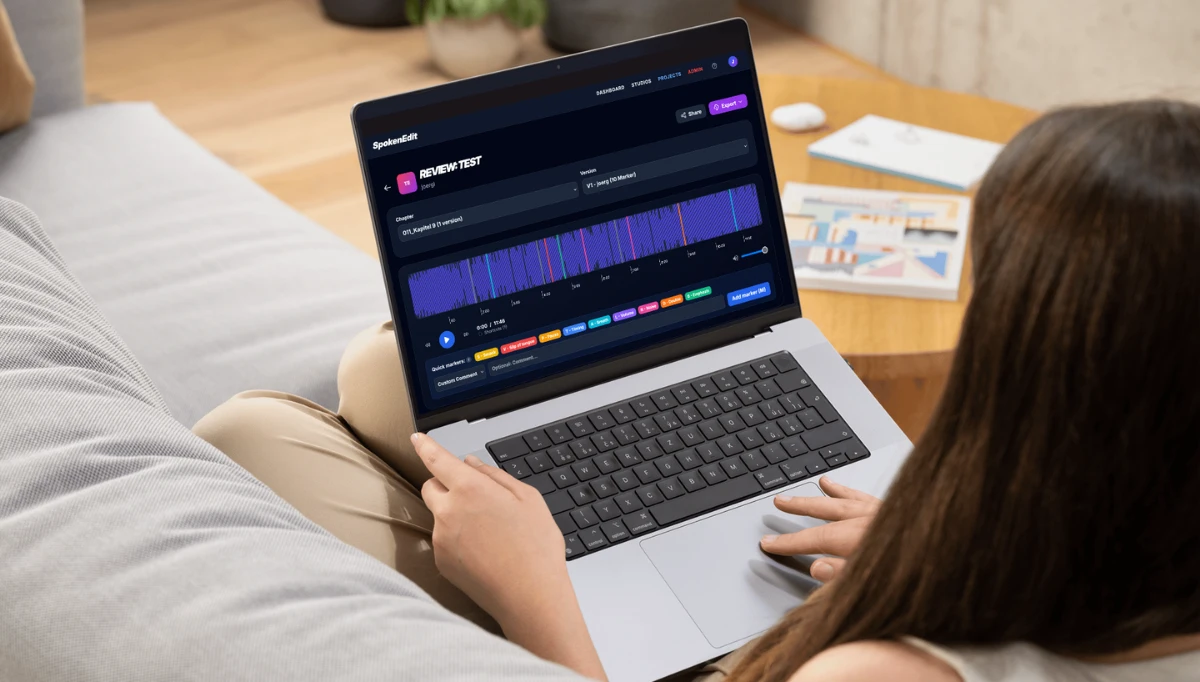
SpokenEdit review interface with waveform, markers and comments
Why SpokenEdit?

Faster correction cycles, better results

Instead of countless cloud links and vague emails: precise audio feedback your team instantly understands

All corrections at a glance

After the review, all corrections appear directly in the waveform, right where they need to be made.

Feedback right in the audio

Place markers with a click or hotkey, comment and categorize (mispronunciation, timing, emphasis, breathing, etc.) and export everything as CSV, PDF, or MIDI for your DAW.

Collaboration that just flows

From speaker to producer: assign clear roles for maximum clarity. Bring in external partners and clients via guest link, no login, no barriers, direct feedback.

Audiobook management made easy

Organize your material into chapters, track versions per chapter, and stay on top of things – even in complex productions.

Read-Along Manuscript

Upload the manuscript as a PDF – reviewers can follow along while listening. Stored encrypted, no download possible.

Ready in 3 minutes

Structured corrections, faster results.

1

Create project & upload

Create a project, upload your MP3 files and SpokenEdit organizes everything in a clear structure.

2

Invite team & externals

Invite speakers, authors, or editors by email or share a review link for guests without an account.

3

Correct & approve

Place markers in the waveform, leave comments on each correction and approve chapters step by step to the finished project.

Fair Pricing

The plan that fits your project

Start for free – no credit card required. Upgrade only when you need more.

Free
Free
  • 250 MB storage
  • One studio included
  • 1 active project (unlimited chapters)
  • Files available for 14 days
  • All review tools

    Markers, versioning, export & guest links

Start for free
Popular
Pro
€15/month
  • 3 GB storage
  • 3 studios

    Organize your clients in dedicated workspaces

  • 10 active projects
  • No file expiration*
  • All review tools

    Markers, versioning, export & guest links

Choose plan
Business
€69/month
  • 20 GB storage
  • 10 studios

    Separate projects by clients, departments, or publishers in isolated workspaces

  • Unlimited projects
  • No file expiration*
  • All review tools

    Markers, versioning, export & guest links

Choose plan
Event Ticket
€29 one-time
One-time payment
  • Everything you need for your project, no subscription required.
  • 10 GB storage
  • One studio included

    Dedicated workspace with team & roles

  • Unlimited projects
  • All review tools

    Markers, versioning, export & guest links

  • 30 days access

    Pay once, 30 days full power. Expires automatically, no cancellation needed.

  • The Event Ticket is a standalone plan and cannot be combined with an existing subscription.
Choose plan

* while your subscription is active

Common Questions

Everything you need to know

What is SpokenEdit and how is it different from Dropbox or Frame.io?
SpokenEdit is a specialized audio review tool, not generic file sharing. Unlike Dropbox or Frame.io, SpokenEdit offers a waveform viewer with a marker system, chapter organization for audiobooks, and role-based reviews. Producers, authors, and voice actors collaborate directly in the browser, no software installation or clumsy timestamp lists needed.
Who is SpokenEdit for?
For everyone producing or reviewing audio in teams: audiobook publishers, podcast productions, recording studios, dubbing studios, voice actors, authors, directors, editors, and producers. Agencies and event organizers with time-limited projects also use SpokenEdit via the Event Ticket.
Which audio formats are supported?
SpokenEdit currently supports MP3, optimized for fast in-browser playback via the waveform viewer. No downloads, no external software – files are streamed and visualized directly in the browser.
How does correction management work for audiobooks?
During playback, click or press [M] to place a marker at the exact spot that needs correction. Each marker can be commented on and tagged with a type – e.g. mispronunciation, timing, emphasis, breathing, or custom comment. The voice actor or editor works through markers step by step and marks them as resolved. All feedback can be exported as CSV, PDF, or MIDI.
Can external people review without an account?
Yes. Via review link, guests can access a chapter without an account, listen to the waveform, and place markers with comments. Perfect for external voice actors, clients, or editors. Access can be revoked at any time.
Is SpokenEdit free to use?
Yes. The Free plan offers 250 MB storage, 1 studio, and 1 project – permanently free, no credit card required. Audio files remain available for 14 days. For more capacity, there's Pro, Business, and the Event Ticket.
What is the difference between Pro, Business, and Event Ticket?
Pro (€15/month): 3 GB storage, 3 studios, 10 projects, no file expiration while your subscription is active. Organize your clients in dedicated workspaces. Business (€69/month): 20 GB storage, 10 studios, unlimited projects. Separate projects by clients or publishers in isolated workspaces. Event Ticket (€29 one-time): 10 GB for 30 days with full team features. No subscription, expires automatically. Ideal for single productions, workshops, or recording sessions.
How secure are my audio files?
All transfers are TLS/HTTPS encrypted. Audio files are only accessible with valid access tokens. Each project has individual permissions, and review links can be disabled at any time. Your unreleased productions stay protected.
How do I organize an audiobook with 50+ chapters in SpokenEdit?
Upload all chapters as MP3 – SpokenEdit automatically organizes them into a chapter structure. Each chapter has its own versions, markers, and approval status. Directors or editors give time-accurate feedback that the voice actor works through chapter by chapter. Stay on top of things, even with large productions.
What formats can I export feedback in?
Markers and comments can be exported as CSV (Excel-compatible), PDF protocol for printing, and MIDI file (markers as events for your DAW). Integrate feedback directly into your production workflow – no media breaks.
What is the difference between a project and a chapter?
A project is the container for your entire assignment (e.g. an audiobook or a podcast). Within a project you can upload as many chapters or audio files as you like. What's limited is not the number of files, but the number of different projects you can work on at the same time.
What happens when my storage is full?
When you reach your limit, you can continue working on existing projects and placing markers. To upload new audio files, you can either delete old projects or upgrade to a higher plan.
Can I add the Event Ticket to my existing Pro subscription?
The Event Ticket is a standalone solution for users without an ongoing subscription. It cannot be combined with an existing plan. If you're already on the Pro plan and need more projects or storage, upgrading to the Business plan is the best option.

Fewer correction rounds, more productivity

Start for free and experience how easy audio feedback can be – for audiobooks, podcasts, and any voice production.